Microcontrollers (MCUs) are at the core of many modern devices. These powerful, small chips help control appliances, gadgets, and vehicles alike.
If you're just getting into electronics or embedded systems, understanding MCUs is paramount; this guide answers commonly asked questions and gives an in-depth explanation of what MCUs do and how they operate.
What Is a Microcontroller (MCU)?

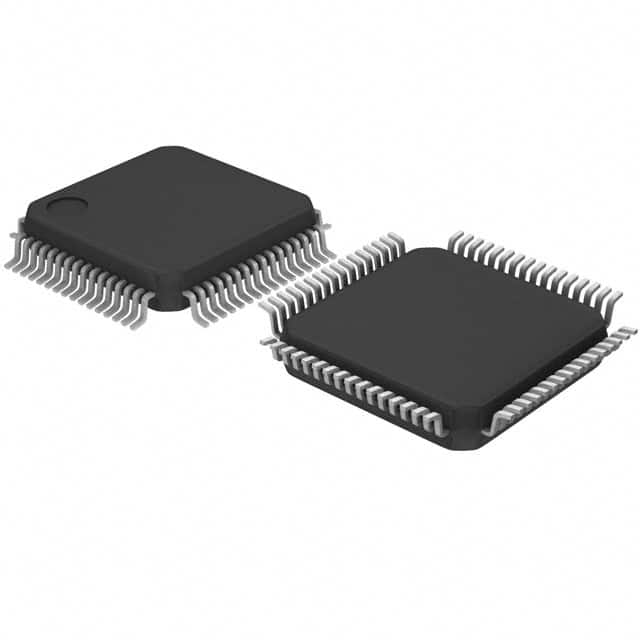
A microcontroller, also referred to as an "MCU," is a single-chip computer equipped with its CPU (Central Processing Unit), memory (RAM and ROM), input/output pins for connecting with external devices, such as sensors, motors, displays, etc. and input/output (I/O) pins that interact with them directly.
An MCU stands out from other processors, such as MPUs (Microprocessor Units), in that it is tailored to accomplish specific tasks with reduced power consumption for embedded systems.
What Is the Difference Between a Microcontroller and a Microprocessor?
Microcontrollers and microprocessors both process data, but each serves specific functions.
Microcontrollers are self-contained systems. With all necessary components (CPU, memory, and I/O) built onto one chip, microcontrollers are ideal for automating specific tasks for appliances, vehicles, and more.
Microprocessors, on the other hand, only handle processing. For their full functionality, external components (including memory and I/O chips) must also be present, which is why they are often found in personal computers or more complex devices.
MCUs tend to be more power-efficient and cost-effective, while microprocessors excel at handling more complex operations.
What Are the Common Applications for Microcontrollers?
Microcontrollers can be found virtually everywhere - making daily devices smarter and more efficient. MCUs control temperature in home appliances like fridges, washing machines, and microwaves, while IoT devices use MCUs to process data and communicate with other devices smart thermostats or fitness trackers, for instance. They even play an essential part in industrial automation, such as robotics robots, conveyor belts, and assembly lines!
These tiny chips form the heart of devices that make our lives simpler and more connected.
How Can I Select an Appropriate Microcontroller for My Project?
Selecting the ideal MCU (microcontroller unit) is paramount to the success of any project. Here are some practical considerations to assist you in your selection process.
Project Requirements and Performance
To start your project on the right foot, determine how much processing power it requires. For simple LED or button controls, an 8-bit MCU such as Arduino Uno should suffice; if, however, your task involves handling multiple sensors or motor control complexity, then 32-bit MCUs such as STM32 or ESP32 could provide more computational horsepower to handle more demanding tasks.
Memory and Storage Needs
MCUs have limited memory; therefore, it is important to consider how much storage your project requires. An Arduino Nano with 32KB flash memory and 2KB RAM should suffice for more complex programs or those requiring greater data storage capabilities or RAM (such as STM32F4 with 128KB RAM and larger flash storage options).
I/O
The MCU must provide enough input/output (I/O) pins. Small projects (such as controlling LEDs or reading basic sensors) may only need a few I/O pins. Still, larger projects or when you require connectivity to multiple sensors and devices may require an MCU with more I/O pins, such as Arduino Mega, which offers up to 54 digital I/O pins, while the ESP32 offers up to 34 pins; make sure that this meets your project requirements before selecting an MCU.
Low Power Consumption
Battery-powered projects necessitate low power consumption for optimal functioning; MCUs such as the ESP32 or STM32L series offer low-power modes tailored to long-term battery use applications. However, power consumption may be less of an issue when connected directly to a power source.
Wireless Communication
To ensure your project succeeds, choose an MCU with built-in Wi-Fi and Bluetooth capabilities. An ideal option would be the ESP32, as this includes both features built into its chips. However, for tasks requiring less advanced connectivity, an ATmega328P (found in Arduino Uno) should also suffice.
Budget Considerations
When working on a tight budget, MCUs such as Arduino Uno or Raspberry Pi Pico may be sufficient to complete most entry-level and intermediate projects. For more complex endeavors, however, high-performance MCUs such as STM32 or ESP32 will offer more features and capabilities despite costing more.
At its core, choosing an MCU depends on understanding your specific project requirements. By considering factors like performance, memory capacity, I/O pins, power consumption, and communication abilities, you'll find an appropriate microcontroller to bring your idea to life. Every project is different, and finding an appropriate MCU will set a firm foundation for success.
What Are Some Well-Known Microcontroller Families?
Certain families stand out regarding microcontrollers due to their features and versatility in use across projects - these include Arduino, STM32, ESP32, and Raspberry Pi Pico, among many others.
Arduino is one of the premier starter platforms, offering boards such as Uno, Nano, and Mega for anyone just getting into electronics. Arduino uses ATmega328P microcontrollers, which are easy to use with their wide selection of resources and tutorials available online. Programming Arduino through its IDE makes it effortless for anyone stepping foot into the electronic world.
STM32 is another robust family of microcontrollers designed for more advanced applications, including automotive, industrial, and medical devices. Boards such as STM32F4 and STM32F0 are great solutions for professional projects requiring low-power but high-performance chips.
Both boards offer multiple performance options, from low-power consumption to high-performance chips suited for professional work environments. STM32 MCUs can help those exploring embedded systems who require greater processing power.
ESP32 boards have gained tremendous traction as a popular solution for IoT projects due to their built-in Wi-Fi and Bluetooth. Popular boards such as the ESP32 DevKit and ESP32-WROOM can handle Wi-Fi and Bluetooth simultaneously, making them great for smart devices with multiple wireless interfaces. Being user-friendly as well, its unique capacity to handle both makes this MCU an exceptional one!
Raspberry Pi Pico is a relatively recent arrival to the scene. Utilizing an RP2040 chip, this board caters to hobbyists and beginners looking for a balance of power and simplicity in an entry-level MCU board. It is popular among educators for teaching embedded systems.
Developers and hobbyists can utilize MCU families, each offering advantages, to find one suitable for their project needs. From sensors-based projects to complex IoT solutions, one will surely be out there that fits!
Is Arduino a Microcontroller or Microprocessor?
Arduino is a microcontroller platform, not a microprocessor. Arduino boards typically utilize MCUs (like ATmega328P ), which are small self-contained chips containing CPU, memory, and I/O pins - ideal for embedded systems and simple control tasks. Arduino boards make programming sensors, motors, and electronics straightforward - perfect for beginners!
Is Raspberry Pi a Microcontroller?
No. Raspberry Pi is not a microcontroller; rather, it is a single-board computer. While microcontrollers (MCUs) typically serve to perform specific control tasks, Raspberry Pi contains a powerful microprocessor like Broadcom BCM2837 that runs full operating systems (normally Linux), providing much greater computing power and ability for complex applications such as web browsing, running servers and even gaming.
Though not technically classified as an MCU, the Raspberry Pi can still control sensors or actuators within projects but may prove too powerful for simple tasks where an MCU would suffice.
Conclusion
Microcontrollers (MCUs) are at the core of many devices, adding intelligence and efficiency. Understanding their operation will open up numerous doors in embedded system design - whether your project involves hobby design or professional engineering.
Now is the time to dive in! Get yourself a development board, start experimenting, and explore online resources to advance your knowledge about MCU - there's an entire world out there waiting for you!